Copyl Helpdesk

E-mail customer support for your own team: every e-mail becomes a ticket, an agent drafts the reply and a person approves it before anything is sent.

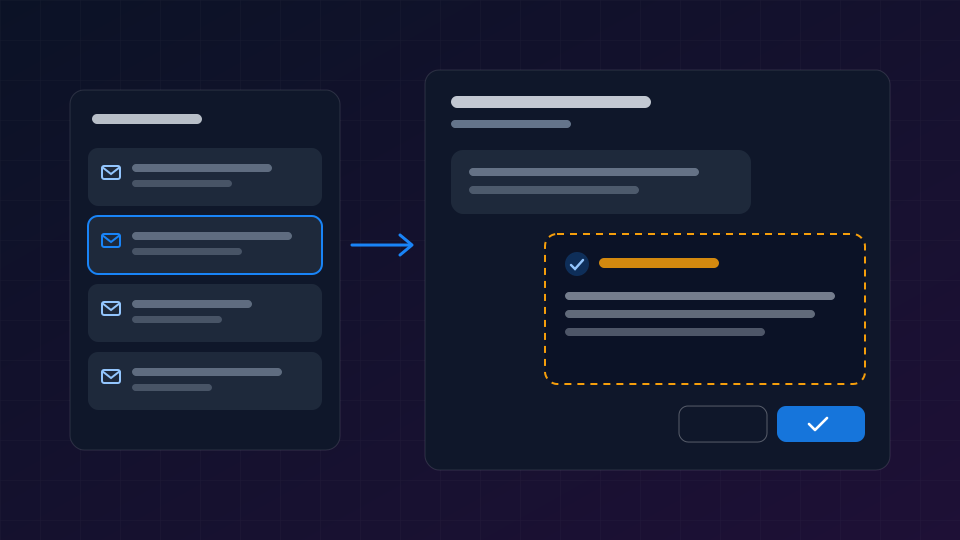
Copyl Helpdesk is a separate app for your support team. E-mail to your support address becomes a ticket in your organisation. An agent drafts a reply and can search your Knowledge Base. The draft waits for a person's approval and is never sent on its own.

Book a meeting →
Copyl Helpdesk

Built for the people who answer customers

Three groups meet in the same ticket. Each sees what they need, and nobody sees more than they are allowed to.

Helpdesk agents

Answer faster without giving up control

The queue, the ticket and the agent's draft reply are in one place. The person handling the ticket decides what is sent.

  • Work from the queue or the list of all tickets
  • Approve, edit or reject the agent's draft reply on the ticket
  • Choose to close the ticket once the solution is sent

Supervisors

Run the team and the inbox

KPIs, sender rules and mailbox settings are open only to the supervisor role.

  • Follow incoming e-mail and open tickets per organisation
  • Open the ticket straight from a KPI row
  • Manage sender rules

Your customers

Only their own tickets

A customer sees their own tickets and never your internal notes.

  • Write to your usual support address
  • Get the answer in the language they wrote in
  • See their own tickets, not other customers'

From e-mail to an approved answer

Everything happens in one app with a queue, all tickets, live chat, Knowledge Base, customers, KPIs and sender rules. Menus are in Swedish and English.

Every e-mail becomes a ticket in the right organisation.

E-mail to your own support address becomes a ticket in your organisation and nowhere else. E-mail to an address that is not mapped to an organisation is rejected.

  • Tickets are isolated per organisation
  • Unknown recipient addresses are rejected
  • Internal notes are never shown to the customer

One queue for the whole team.

Agents work from the queue or from the list of all tickets, with live chat, the Knowledge Base and the customer register in the same app.

  • Queue and all tickets
  • Live chat and customer register
  • The Knowledge Base in the same app

Draft replies from an agent.

An Agent Hub agent drafts a reply in the customer's language and can search your Knowledge Base. The draft is held for approval.

  • The draft follows the customer's language
  • The agent can search your Knowledge Base
  • No draft is sent without approval

Approve on the ticket.

The agent handling the ticket sees the held draft on the ticket and approves it as it is or after editing. Copyl then asks whether to close the ticket.

  • Approve as is, or edit first
  • Choose to close the ticket once the solution is sent
  • The same approval appears in the approval list on the Copyl dashboard

Two roles, clear boundaries.

Helpdesk has an agent role and a supervisor role. Access needs both a role and a Helpdesk seat.

  • Helpdesk Agent and Helpdesk Supervisor roles
  • Access needs a role and a seat
  • KPIs and settings for supervisors only

KPIs for the supervisor.

The supervisor sees incoming e-mail and open tickets per organisation and opens a ticket straight from the KPI view.

  • Incoming e-mail per organisation
  • Open tickets per organisation
  • From number to ticket in one click

How it works: from e-mail to sent answer

E-mail

A customer writes to your support address.

Ticket

Copyl creates a ticket in your organisation.

Draft

An agent drafts a reply in the customer's language.

Human decision

A person approves, edits or rejects the draft.

Answer

The approved answer is sent, and the person chooses whether to close the ticket.

Two situations, step by step

Both follow the same flow, and in both a person decides what the customer receives.

A customer asks how a feature works

  1. 1. E-mail

    A customer e-mails a question to your support address.

  2. 2. Ticket

    The e-mail becomes a ticket in your organisation and lands in the queue.

  3. 3. Draft

    An agent searches the Knowledge Base and drafts a reply in the customer's language.

  4. 4. Human decision

    The person on the ticket reads the draft, adjusts a sentence and approves.

  5. 5. Answer

    The answer is sent. The ticket keeps the question and the answer.

A solved ticket is closed

  1. 1. E-mail

    A customer reports a problem the team already has a solution for.

  2. 2. Ticket

    The ticket lands in the queue of the right organisation.

  3. 3. Draft

    The agent proposes a reply with the solution.

  4. 4. Human decision

    The person on the ticket approves the reply.

  5. 5. Answer

    Copyl asks whether to close the ticket now that the solution is sent, and the person chooses.

The agent proposes. A person decides.

Draft replies from an agent are held until a person has approved them, and they appear in the approval list on the Copyl dashboard. Tickets and customers are isolated per organisation, and roles decide who sees what.

Start with

Copyl HelpdeskAgent Hub

See a support e-mail become an approved answer

Book a meeting and we will walk through the flow from incoming e-mail to sent answer.

Book a meeting →

Questions from support teams

Does the AI send replies to customers on its own?

No. The agent's draft replies are held until a person approves them, as they are or after editing.

Can a customer see other customers' tickets?

No. Tickets are isolated per organisation; a customer sees only their own tickets and never your internal notes.

Which languages work?

The draft reply follows the language the customer wrote in. The app's menus are in Swedish and English.

Where is our data hosted?

In the EU.

How do we get started?

Book a meeting. Bring a few typical support e-mails and we will walk through how they become tickets and answers in Copyl Helpdesk.

Works with the systems you already have

Copyl does not replace the systems you already run. Your maintenance, finance, inventory, HR and sensor systems connect to Copyl through its integration platform — governed, permission-checked and logged.

You get the apps and the AI agents on top of what you already have. Your existing systems become data sources for the agents.

Copyl Helpdesk receives e-mail on your existing support address

Explore other industries

View all industries